Capturing thoughts
Use the web app, voice, or photo today. Email capture passed one controlled production plain-text email test on September 2, 2026, including temporary-file cleanup. SMS is disabled.
Type it
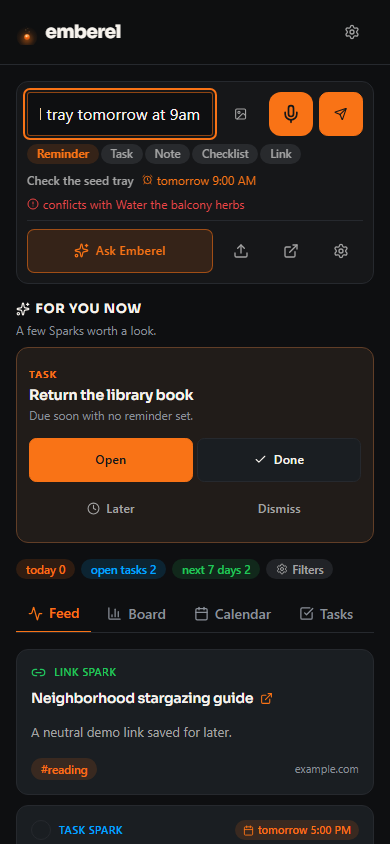
The capture composer on Home is the fastest path. Type a sentence and Emberel drafts a Spark — deciding whether it behaves as a reminder, task, note, checklist, or link. You can review the preview, choose a type, add date/time or tags, and press Expand for a full note editor.
Text it (activation pending)
The SMS campaign and sender registration are approved, but SMS_ENABLED=false and SMS remains unavailable to public-beta accounts. One authorized demo reminder passed provider delivery, handset receipt, DONE, HELP, STOP, and START checks; free-text capture, SNOOZE, EDIT, retry/failure handling, and broader-device acceptance remain separate. For any later controlled activation, the only initial opt-in is the optional, unchecked consent box beside the mobile field in signed-in Settings → Profile. A first text from that saved number verifies control; it is not a second opt-in. Emberel does not use an initial keyword opt-in. STOP opts out, START restores a previous consent, and HELP provides support. See the exact disclosure in the SMS Consent & Messaging Policy.
Email it
Your private capture address is in Settings → Profile. On September 2, 2026, one authorized, fictional plain-text email passed Email Routing → Worker → R2 → Queue → app/D1 → visible Spark → staged-object deletion. The message identifier matched across the send, staging, and capture records. Local retry and deduplication tests also pass. This is a controlled text-email receipt, not blanket proof for every attachment, sender, or load condition. Open the resulting Spark to review and correct its type or details.
New capture aliases use an unbiased 20-character suffix with about 99 bits of entropy. Source and D1 tests prove that regeneration replaces the row and the old alias no longer resolves. Existing aliases are not silently rotated; rotate the live address only through an approved rollout that also replaces any exposed evidence.
Speak it
Record a voice note or upload a supported audio file and Emberel transcribes it into one or more Sparks. A single result offers Edit and whole-capture Undo. A split result names every created Spark, labels any first-item action as Open first, and offers Undo all. Voice capture is available during the beta; raw recording retention and playback depend on account entitlement and storage configuration. No paid voice quota is an active offer.
Photograph it
Snap, paste, or upload a receipt, whiteboard, inspection sticker, screenshot, or flyer. Emberel uses OCR and visual analysis to draft the title, details, and relevant date, then asks you to confirm before saving. Photo email attachments use the same pipeline. MMS joins that pipeline after SMS activation.
What happens next
Every capture is classified automatically — Emberel:
- decides the behavior (reminder, task, note, checklist, or link) — and quietly upgrades a dated note into a reminder;
- pulls out any date, time, or recurrence (“every morning,” “the 1st”) and any checklist it finds;
- applies your tags and keywords (see Organizing);
- warns you if a new timed Spark lands right on top of an existing one.
Confirmation behavior is channel-specific. Web text capture offers rich single-item correction and whole-capture undo; onboarding offers Open/edit and Undo; voice labels split results honestly and can undo the set; direct photo capture drafts in the composer before save. For SMS, UNDO reverses a supported DONE or a current SNOOZE; an ambiguous UNDO never deletes a Spark and instead directs you to EDIT for reviewed deletion. Nothing is locked in — open a Spark later to change it. If you turn AI classification off, capture continues with built-in rules.