Web & iPhone
Emberel Notes runs in a web browser for people with access. A native iPhone app is in development.
The web app
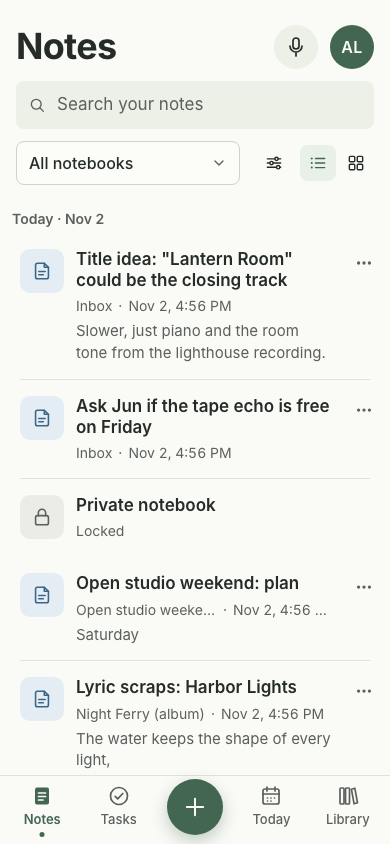
Open the Emberel Notes sign-in page in a current version of Chrome, Edge, Firefox or Safari. On a wide screen you get the notebook rail, your notes list and the editor side by side. On a phone-sized screen the app switches to a single column with a bar along the bottom: Notes, Tasks, a + for Capture, Today and Library.
On phone-sized screens a few Settings sections use longer names: AI appears as AI & connections, Privacy & recovery as Privacy & storage, and Storage & export as Data & backup.
If your browser offers to install the site as an app, you can use Emberel in its own window. In the installed app, Ctrl+N (⌘N) also opens Capture.
Signing in and syncing
- Sign in once on each device. Your ordinary notes then open without asking for your password again.
- Changes sync automatically between your signed-in devices. The note header shows Saving, Saved on this device, Waiting to sync or Synced.
- You can keep working offline. Changes are saved on the device and sync when you reconnect. Settings → Account shows sync status and a Sync now button.
- See and revoke your sessions under Settings → Account → Account and sessions. Sign out and lock signs this browser out.
Browser storage can be cleared by the browser or by you, so keep a backup. See Export, backup & deletion.
The iPhone app
An iPhone app is in development. There’s no public App Store or TestFlight download. This page will be updated when a release is available.
Until then, sign in in Safari on your iPhone to use the phone layout. Whether background reminders work in a phone browser depends on the browser and device.