The original Emberel app
The original Emberel app, built around Sparks and reminders, stays available at app.emberel.com for existing accounts. This page keeps its essentials in one place.
Separate from the workspace. Accounts and data in the original app are separate from the new workspace at notes.emberel.com, and nothing moves between them automatically. The original app has its own sign-in (Google or a verified email).
Using the original Emberel app? Sign in here (app.emberel.com).
Sparks
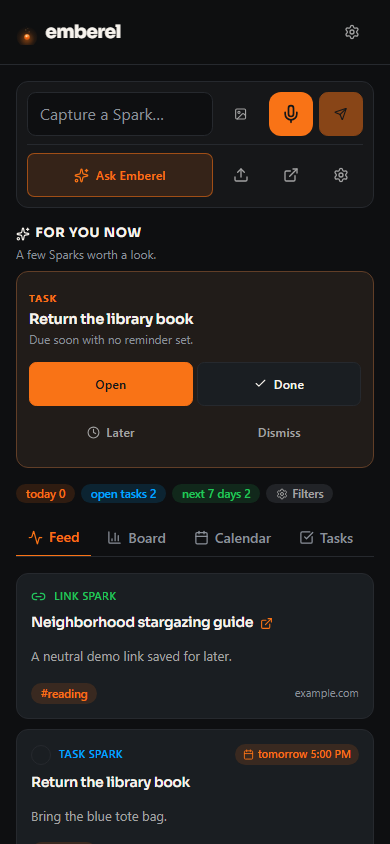
In the original app, everything you capture is a Spark. The app decides whether it behaves as a reminder, task, note, checklist or link, gives it a title, and lets you correct it. Home can show one to three Sparks in For you now, and your library has Feed, Board, Calendar and Tasks views.
Ways to capture
- Web app, voice and photo (OCR): available in the app.
- Email: your private capture address is in Settings → Profile. One controlled production test of a plain-text email passed on September 2, 2026; that isn’t a guarantee for every attachment, sender or load.
- Text messages (SMS): the SMS campaign was approved on September 2, 2026, but SMS remains disabled pending controlled activation tests, and there are no SMS allowances. The SMS Consent & Messaging Policy describes the opt-in that would apply after activation.
Reminders and the weekly digest
Dated Sparks come back through Today and due views, and scheduled reminders can arrive by email when email delivery is configured. The weekly digest email (“Your week with Emberel”) lists what’s coming up, what’s overdue and up to five recent undated Notes; choose its day and hour, or turn it off, in Settings → Notifications (it defaults to Monday at 8:00 local time).
Ask
Start a capture with ? or open Ask to question your saved Sparks, calendar and visible memory. Broader questions can use general model reasoning, so not every answer comes from your saved data. AI in the original app uses Cloudflare Workers AI; turn off AI capture and chat in Settings → AI & memory to use built-in rules instead.
Google Calendar and Tasks
Calendar and Tasks sync need a separate Google permission, from onboarding or Settings. Mappings in both directions are implemented with duplicate and loop safeguards; no fresh check of every connected account is claimed.
Assistant connectors (MCP)
The original app’s MCP service at https://mcp.emberel.com/mcp is access-gated to the demo/owner account, approved beta accounts, active trials and entitled accounts. Signing up alone doesn’t grant access. Eligible users approve each assistant on an Emberel consent screen and can revoke it in Settings → Integrations.
Your data in the original app
- Export: Settings → Your data exports active Sparks and tags as CSV or JSON. Generated exports become eligible for cleanup after seven days.
- Delete: Settings → Danger zone → Delete account.
- Plans: a free public beta; paid checkout is inactive.
- Legal: the Privacy Policy and Terms on emberel.com describe the original app.
Questions: [email protected].