Recordings & transcripts
Record a conversation, an idea or a rehearsal directly in Emberel, and type alongside it. The recording stays with the note, where you can transcribe it and turn clear follow-ups into tasks.
Record
- Open Capture → Record and allow microphone access when asked. Emberel captures audio in your browser.
- Type notes while you record. Use Pause and Resume for breaks, or open Bookmarks & recording options to mark a moment.
- Stop when you’re done. Emberel encrypts and saves the audio as you go.
Open the recording note’s Notes, Transcript or Summary tab. To find it again, go to Library → Saved views → Recordings. Recording takes place in the app; Emberel does not join meetings for you.
Transcripts and summaries
In Settings → AI → Recording defaults, choose how new recordings are handled:
- Cloudflare (recommended): send the audio to Emberel’s built-in transcription service when permitted. No API key needed.
- On this device: transcribe in the browser using the English speech pack. Download it from Settings → AI → Local transcription first and leave the app open while it works.
- Start manually: record now and start transcription from the recording when you’re ready.
With Cloudflare selected, Create an editable summary after transcription also prepares a summary when the transcript is ready. Choose Save recording defaults. You can correct the transcript, edit the summary, or start a summary manually with a configured assistant.
Turning off automatic cloud AI for ordinary notes prevents recordings from being processed in the cloud automatically. A Private recording stays local unless you explicitly approve supported cloud processing for the selected recording. See When AI reads a note.
Turn a transcript into follow-ups
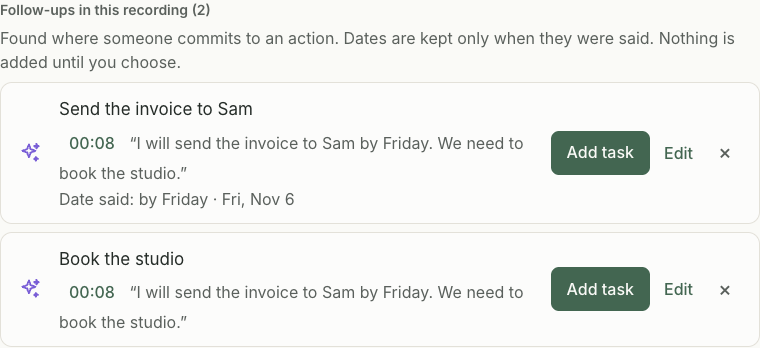
- Open Transcript and find Follow-ups in this recording. Suggestions come from clear spoken commitments in the transcript and do not require a Summary.
- Use a suggestion’s timestamp to play that passage. A clear spoken date can be included; unclear dates are left unscheduled for you to decide.
- Choose Add task, Edit to adjust its title or date, or Dismiss. From the saved task, use Open source to return to the recording at the relevant passage.
If processing stops
- If transcription fails, the original audio stays in the note. Try transcription again from there.
- If one part fails, the rest of the transcript is kept. You can continue and mark the failed part as missing.
- If a summary fails, the transcript, follow-up suggestions and original audio are still available.